


NSF PAPPG 24-1 Supplement 2 (NSF 26-202) has new requirements for publishing journal articles based on NSF-funded research. Use the flowcharts and references on this page to plan and finalize your publications.
NSF Public Access Policy Overview
NSF PAPPG 24-1 Supplement 2 (NSF 26-202) requires NSF-funded Author Accepted Manuscripts accepted for publication in a journal to be deposited in the NSF Public Access Repository (PAR) on or before the official date of publication.
Researchers can take the following steps to comply with the policy:
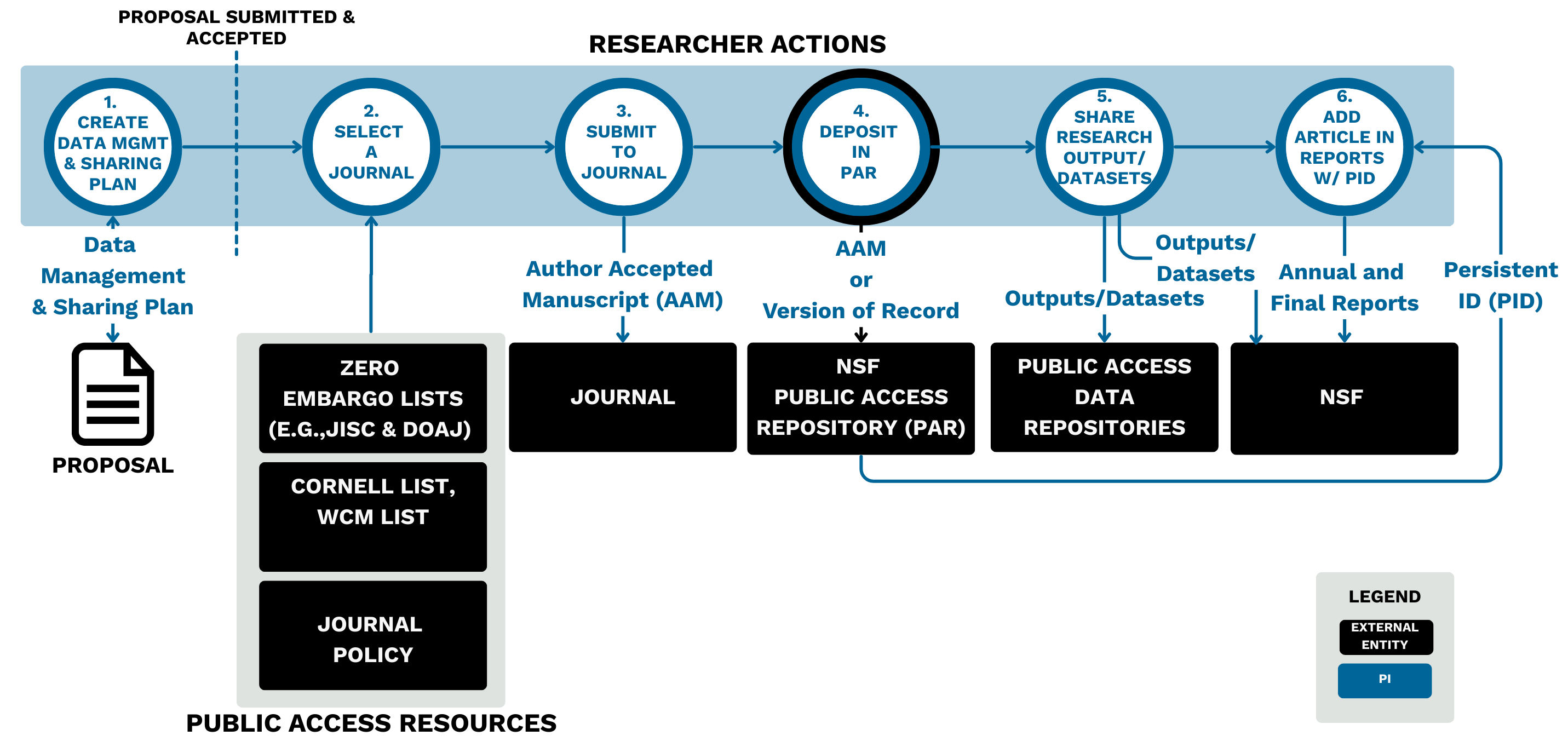
- Create Data Management and Sharing Plan–In your proposal, create a data management and sharing plan that describes how your proposal conforms to NSF policy on sharing data supporting NSF-funded publications, or give an explanation of any exceptions to this sharing requirement.
- Select a Journal–Read journal policies and use public access resources.
- Submit to Journal–Submit the Author Accepted Manuscript (AAM) to the eligible journal.
- Deposit in NSF Public Access Repository (PAR)–Deposit your Author Accepted Manuscript (AAM) or Version of Record in the NSF Public Access Repository (PAR) on or before the official date of publication.
- Share Research Outputs/Datasets–Share underlying research outputs and datasets with the public.
- Add Article in Annual/Final Reports with Persistent ID (PID)–Add the article to NSF annual and final reports with a Persistent ID (PID). If you cannot create a PID, you can use the PAR ID from the NSF Public Access Repository. Metadata should be automatically added via the PID; if not, manually enter the metadata.
Each step is described in a section below.
Note: If a project is sponsored by both NIH and NSF, you must deposit your Author Accepted Manuscript in both NIH's PubMed Central (PMC) and NSF's Public Access Repository (PAR).
1. Create Data Management and Sharing Plan
In your proposal, create a data management and sharing plan that describes how your proposal conforms to NSF policy on sharing data supporting NSF-funded publications, or give an explanation of any exceptions to this sharing requirement.
For more guidance on proposals, see:
Note: For help in preparing a data management plan or sharing your data, see the Cornell Data Services guide on writing a data management and sharing plan and contact Cornell Data Services at data-help@cornell.edu.
2. Select a Journal
Read journal policies and use public access resources.
To comply with the NSF public access policy, you can submit to journals that allow for an article to be submitted to the Public Access Repository on or before the official date of publication.
The following flowchart shows an overview of evaluating a journal:
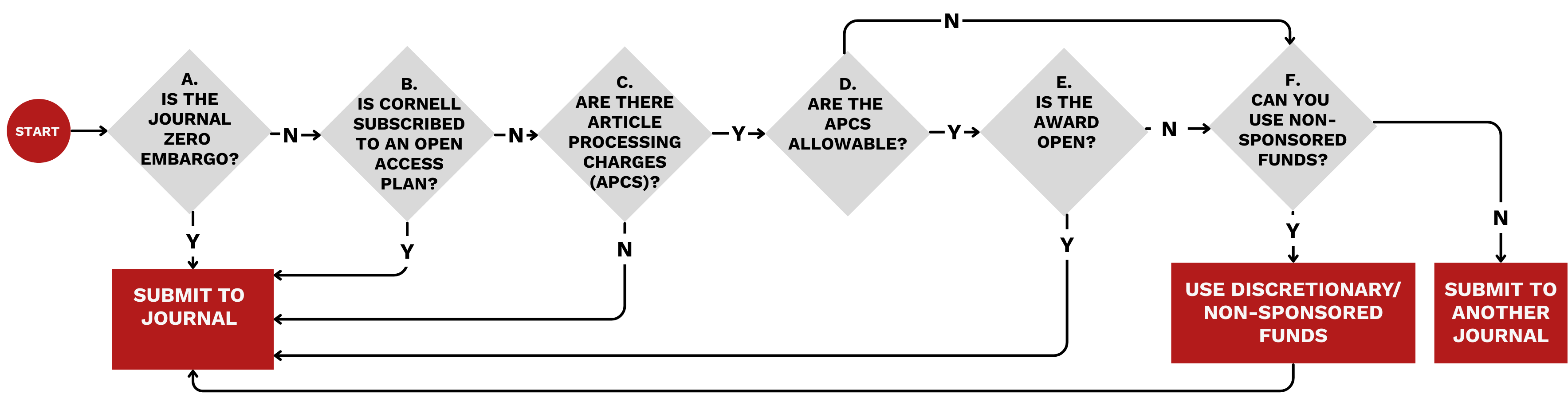
Read a journal’s policies and check the following resources to find information about fees, possible embargoes, and licensing.
Check if the journal meets one of the following criteria:
A. The journal is zero embargo. Is the journal:
- Open Access/Zero Embargo: In DOAJ or JISC lists.
- You can also search publisher websites for key terms like “self-archiving” or “green OA” (Open Access).
B. Cornell or WCM has a publisher agreement to cover Open Access costs.
C. There are no Article Processing Charges (APCs).
- OR: D. Article Processing Charges are allowable costs to the NSF.
- NSF will not cover:
- Costs for a right or a license to deposit Author Accepted Manuscripts to the Public Access Repository (author deposit is free).
- If the costs are not allowable, you can submit to another journal or pay APCs using discretionary or other non-sponsored funds.
- For specific questions about allowable charges on your grant, contact your Research or Department Administrator.
- NSF will not cover:
- AND E. The award is open.
- Publication costs may be charged to NSF after the period of performance and before closeout (i.e., during the 120-day liquidation period).
- If the award is closed, pay APCs using discretionary or other non-sponsored funds.
OR: F. Pay APCs with discretionary/other non-sponsored funds.
- If you do not have sufficient funds, select a different journal.
Note: For help in selecting applicable journals and navigating open access fees, reach out to your library liaison or open-scholarship@cornell.edu.
Note: Simply publishing an open access article does not make you compliant with this policy; you must deposit an Author Approved Manuscript to the Public Access Repository.
Note: If you choose a closed journal, you can use your Federal Purpose License (sometimes called a government use license) on the grant to deposit the article to the Public Access Repository; however, if depositing the article to the Public Access Repository with zero embargo violates the journal’s agreement, the article may not be published, or you may face other legal actions.
3. Submit to Journal
Submit the Author Approved Manuscript (AAM) to the eligible journal.
4. Deposit in NSF Public Access Repository (PAR)
Deposit your Author Approved Manuscript (AAM) or Version of Record in the NSF Public Access Repository (PAR) on or before the official date of publication.
5. Share Research Outputs/Dataset
Share underlying research outputs and datasets with the public, as described in the DMSP.
Note: For help in preparing a data management plan or sharing your data, contact Cornell Data Services at data-help@cornell.edu.
6. Add Article in Annual/Final Reports with Persistent ID (PID)
Add the article to NSF annual and final reports with a Persistent ID (PID). If you cannot create a PID, you can use the PAR ID from the NSF Public Access Repository.
In your AAMs and datasets, add a minimum set of descriptive metadata specified in the annual project reporting requirements.
Note: Metadata elements are normally automatically added via the Persist ID (PID) when you submit to PAR; if a PID is not available at the time of submission, you must manually enter any metadata.
Contacts
- For help in selecting applicable journals and navigating open access publishing, reach out to your library liaison or open-scholarship@cornell.edu.
- For questions about allowable charges, contact your Research or Department Administrator.
- For help in preparing a data management plan or sharing your data, contact Cornell Data Services at data-help@cornell.edu.